
Decipher
A first read on any commercial real estate deal in minutes, not hours.
Decipher helps commercial real estate underwriters decide, fast, whether a deal deserves a closer look. That call used to live in large Excel models with separate tabs for leases, development, tax and cash flow. I designed the web app that replaces the first hours of that work: describe the deal in one line or drop the offering memorandum, and get a plain-language read in minutes.
Problem
Investors look at a lot of deals to close a few. Every first look meant opening the spreadsheet, typing numbers in by hand and hoping the formulas still held.
- Lost between tabs. Inputs, outputs and scenarios sat in different corners of huge sheets.
- A new file for every scenario. Testing a lower price or a different loan meant copying the model and editing it.
- No single version of the truth. Different copies existed for different joint venture and LP/GP splits.
- Hours before a first answer. Too slow for screening many deals in a week.
Goal
Give an underwriter a trustworthy first read on a deal without opening a spreadsheet, and keep the full model one click away when the deal is worth it. Decipher does not replace the underwriter. It takes the typing and the arithmetic off their plate.
My role
Product designer at Native Productions. I ran discovery, mapped the flows in FigJam, scoped the first release with the client, and designed the web app in Figma, from the chat home to project workspace and reports.
I used AI to break down the client's spreadsheets and their formulas, and to research the tools already on the market. The findings, and the call to scope the first release down, were mine.
Research
I went through the client's underwriting spreadsheets tab by tab: lease, new development, tax projection, cash flow, plus the banker and investor summaries. Then I wrote two things to work from:
- A field dictionary. Every input, what it means and what it drives. Purchase price feeds the financed amount and tax savings. "Finance? Y/N" shows or hides the whole banking section. It turns a spreadsheet only its author can explain into a list of rules a developer can build.
- Eight pain points, each paired with a fix. The four above shaped the product most. The others (sharing by email, formula mistakes, slow onboarding for junior underwriters) went into the backlog.
I also mapped what the app should not be. The client was clear that it is not accounting software: no ledgers, no invoices, no contracts. Numbers go out as CSV files to the accounting tools finance teams already use.
- 8
- Pain points mapped from the spreadsheets and client calls
- 4
- Underwriting models scoped: new development, lease, tax and cash flow
- 15-20
- Key inputs a deal needs before the model can run
The scoping call
The first plan covered all four models plus AI suggestions on top. I reviewed a feature-heavy AI underwriting product already on the market and recommended we not match it feature for feature. The first release should answer one question well: is this deal worth a closer look, or should I walk away?
That became the Gut Check. The full models still exist, but they come after the first answer, not before it.
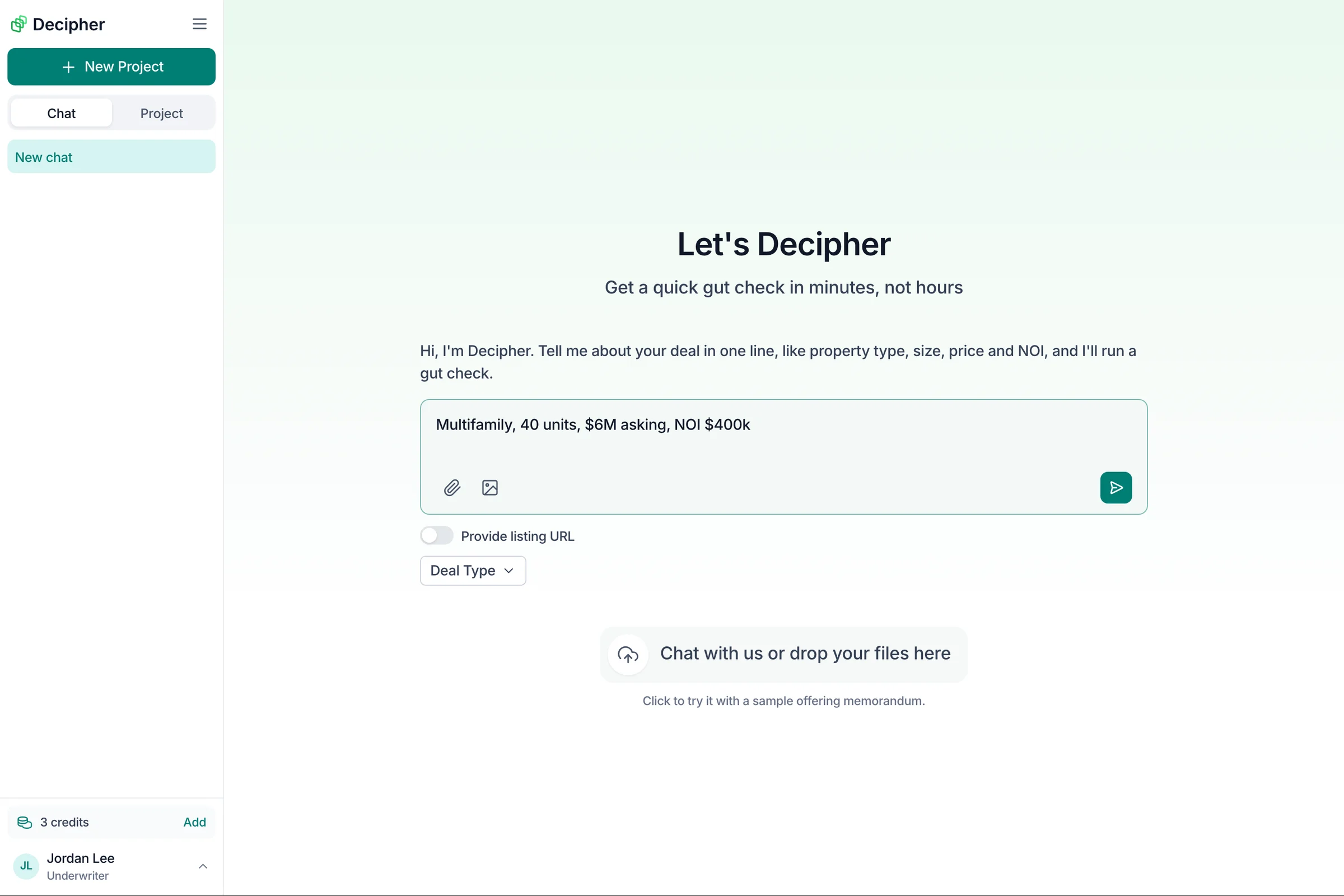
How the Gut Check reads
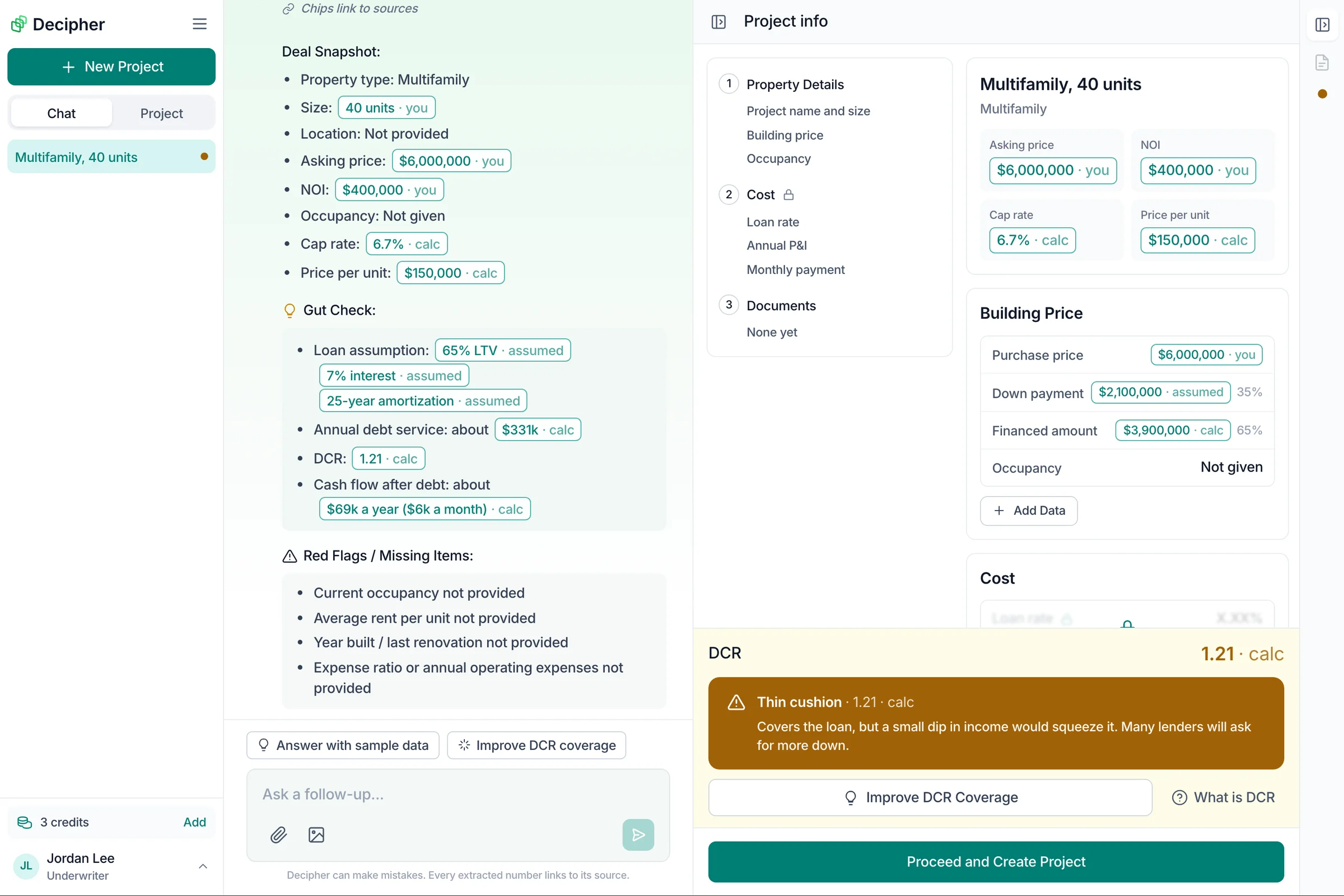
Underwriters scan, so every answer follows the same order:
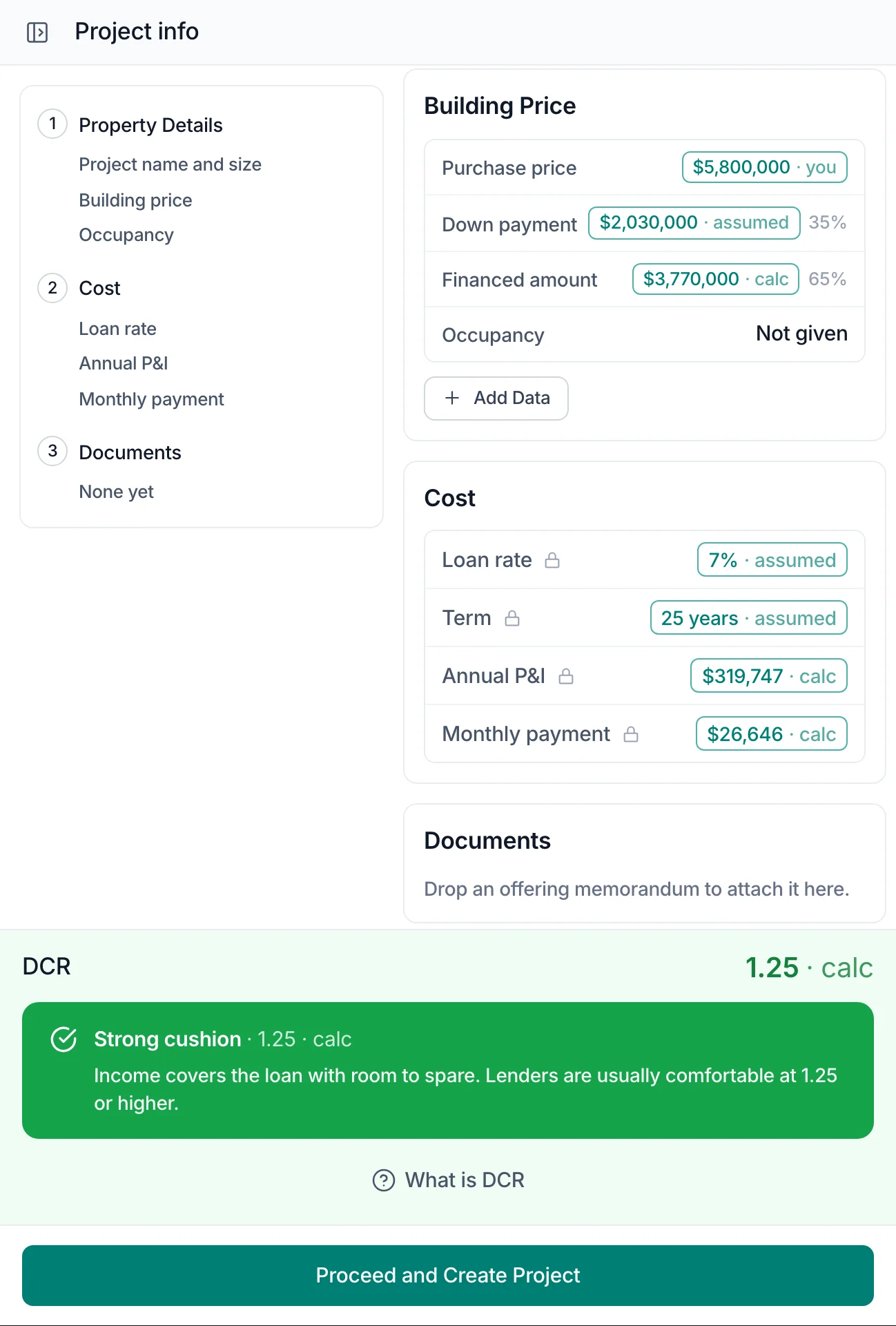
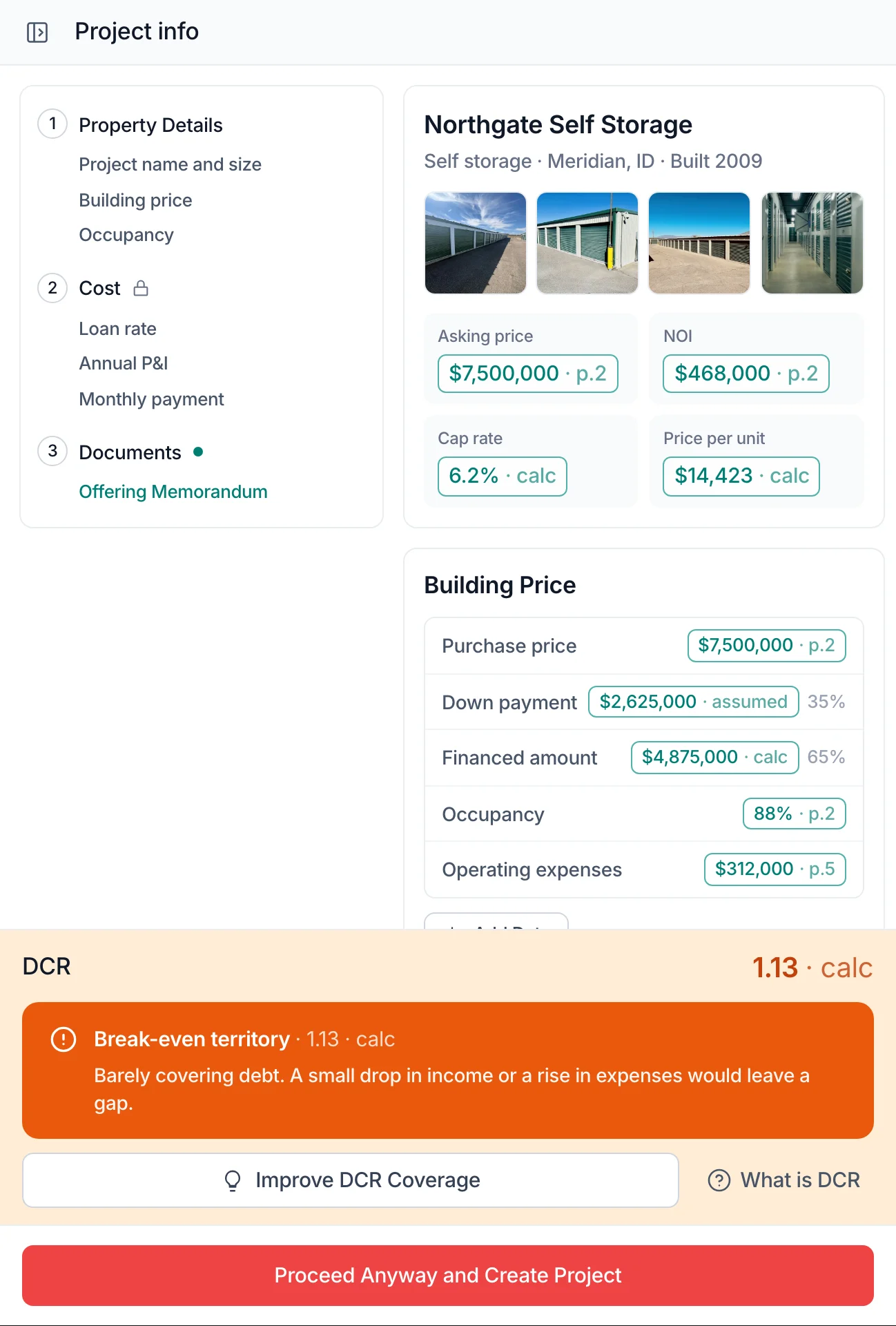
- Deal snapshot. What Decipher understood: type, size, price, NOI, implied cap rate, price per unit. Anything missing says "Not provided" instead of being guessed.
- Gut check. If the user did not share financing, Decipher assumes a standard loan (65% loan to value, 7%, 25 years) and says so, so there is a debt coverage number from the very first message.
- Red flags and missing items. Occupancy, rent per unit, year built, expense ratio.
- Fast take. A green, yellow or red call in plain words, then the exact questions that would firm it up, with an "Answer these" button that drops them into the message box.
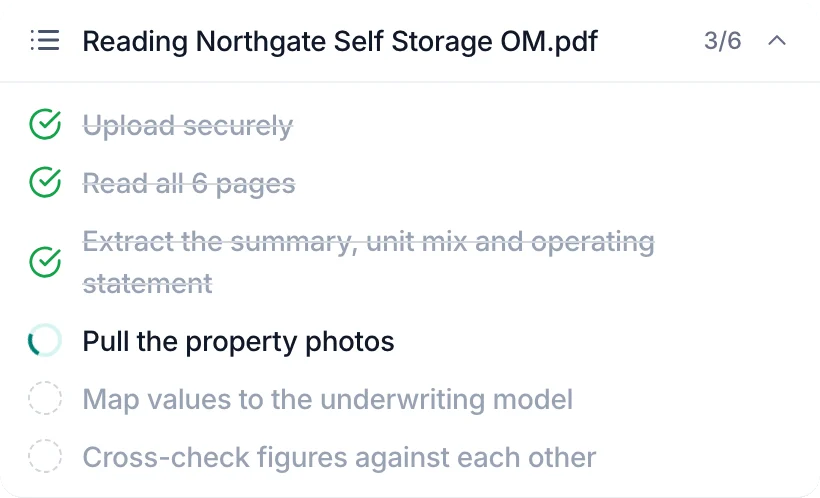
While Decipher works, a short checklist shows each step it is taking. The project panel on the right fills itself in from the same data. When the deal looks right, "Proceed and Create Project" asks for a quick confirmation, then turns the chat into a full project.
Try it
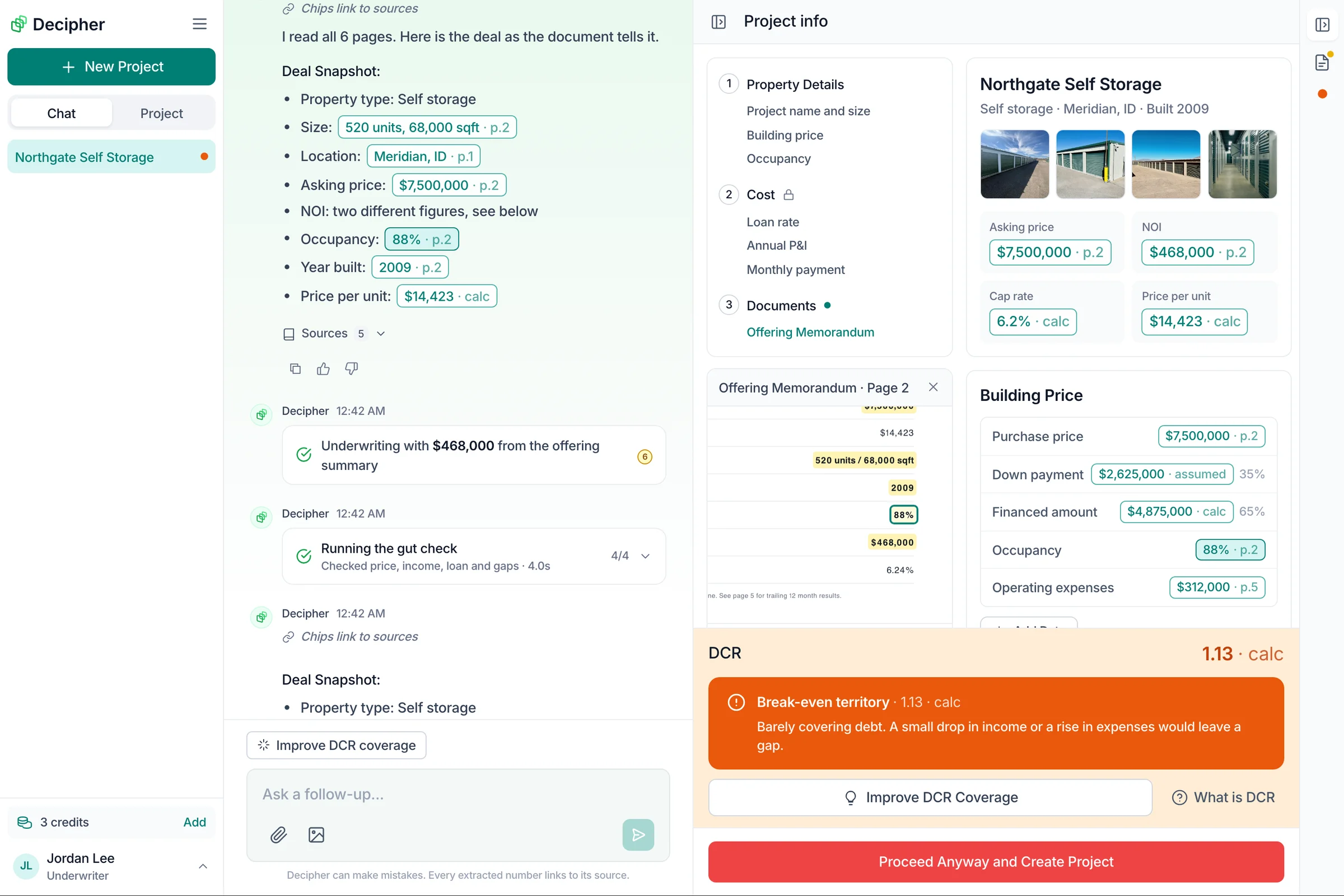
The prototype below takes the Figma screens a step further, toward how an AI product should behave. Decipher shows its plan as a checklist while it works, asks before it spends a credit or creates a project, and cites every number. A chip like "$7,500,000 · p.2" opens that page of the offering memorandum with the value highlighted. "calc" and "assumed" chips explain how the number was made.
Two ways in:
- Send the sample deal. Answer the follow-ups, use Improve DCR coverage to fix the loan, then create the project and add a scenario.
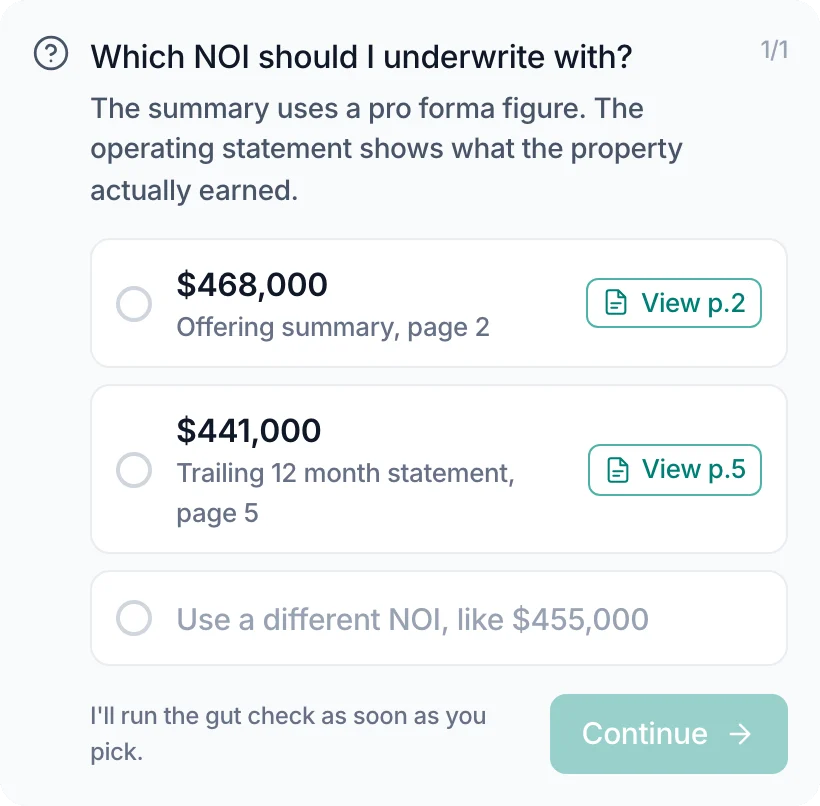
- Drop the sample offering memorandum. It is a real six-page PDF of a made-up property. Pick which of its two NOI figures to trust, then click any chip to see where it came from.
Designing for trust
Investors put real money behind these numbers, so every AI answer had to show its working.
- Risk in plain words. Debt coverage ratio (DCR) is shown on four bands, from strong cushion at 1.25 and up to high risk below 1.10. Each band says what it means for a lender, and "What is DCR" is always one tap away.
- Fixes, not just warnings. A weak result comes with "Improve DCR coverage", so the next step is to explore what would bring the deal back to safe ground, like a lower price or a bigger down payment.
- Assumptions out loud. Every number Decipher fills in on its own is labelled as an assumption, never mixed in with what the user gave it.
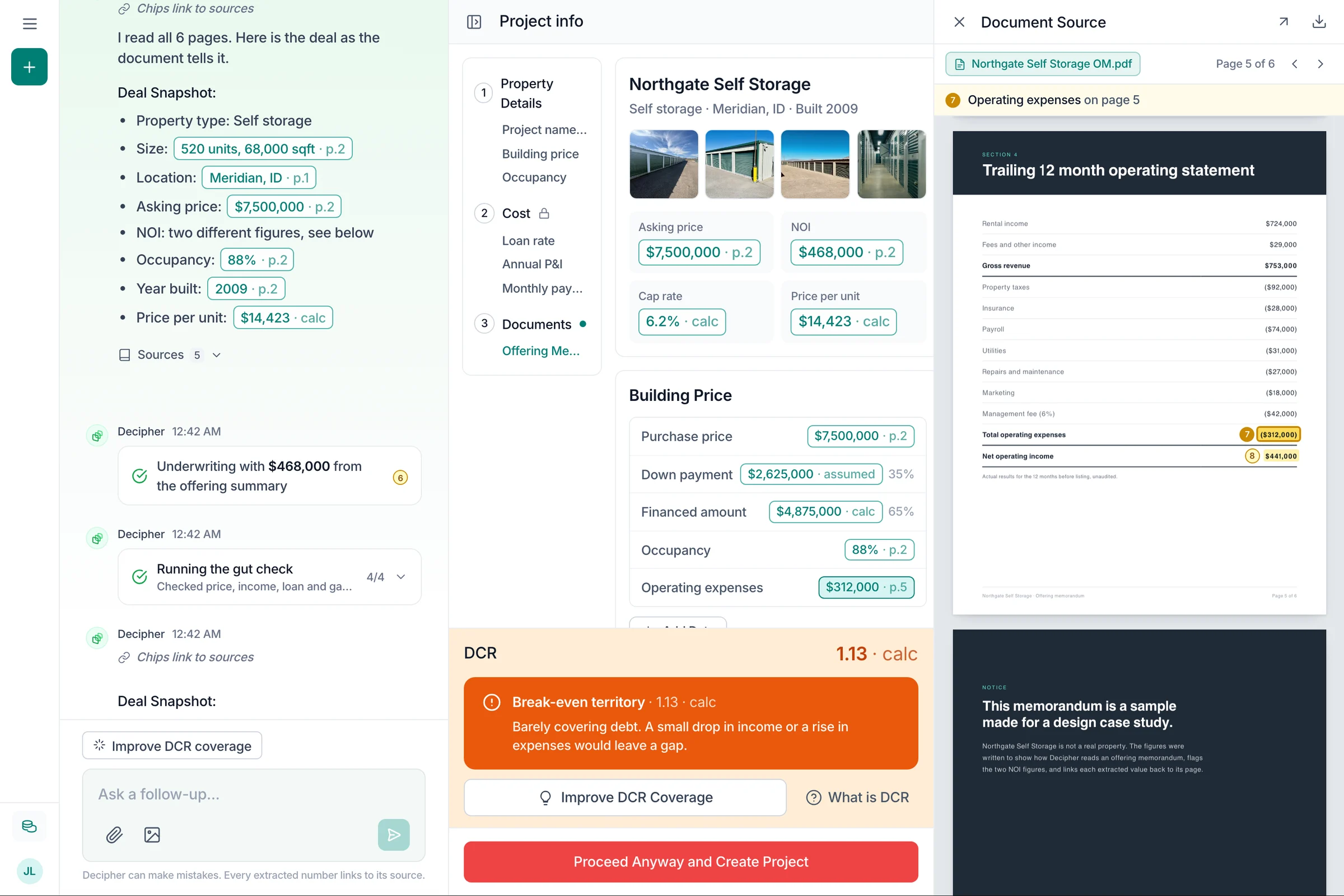
- Every number has a source. Numbers show where they came from: a page of the document, a calculation, or an assumption. One click opens the page with that number highlighted, so nobody has to take the AI's word for it.
Edge cases
Document upload is where AI products break, so I listed the failure cases before drawing the happy path:
- Two values for the same field. Show both values and where each came from, and let the user pick.
- Several offering memoranda for one deal. Label them OM v1 and OM v2, and let the user choose the active one.
- Missing or confusing data. Flag it and take the user straight to that spot in the document, or to the field they need to fill.
- Out of credits. A clear top-up step instead of a dead end.
Extraction takes about a minute and can run up to three, so Decipher shows its plan as a checklist that ticks off step by step instead of a spinner with no end. When the document disagrees with itself, it stops and asks.
From gut check to full model
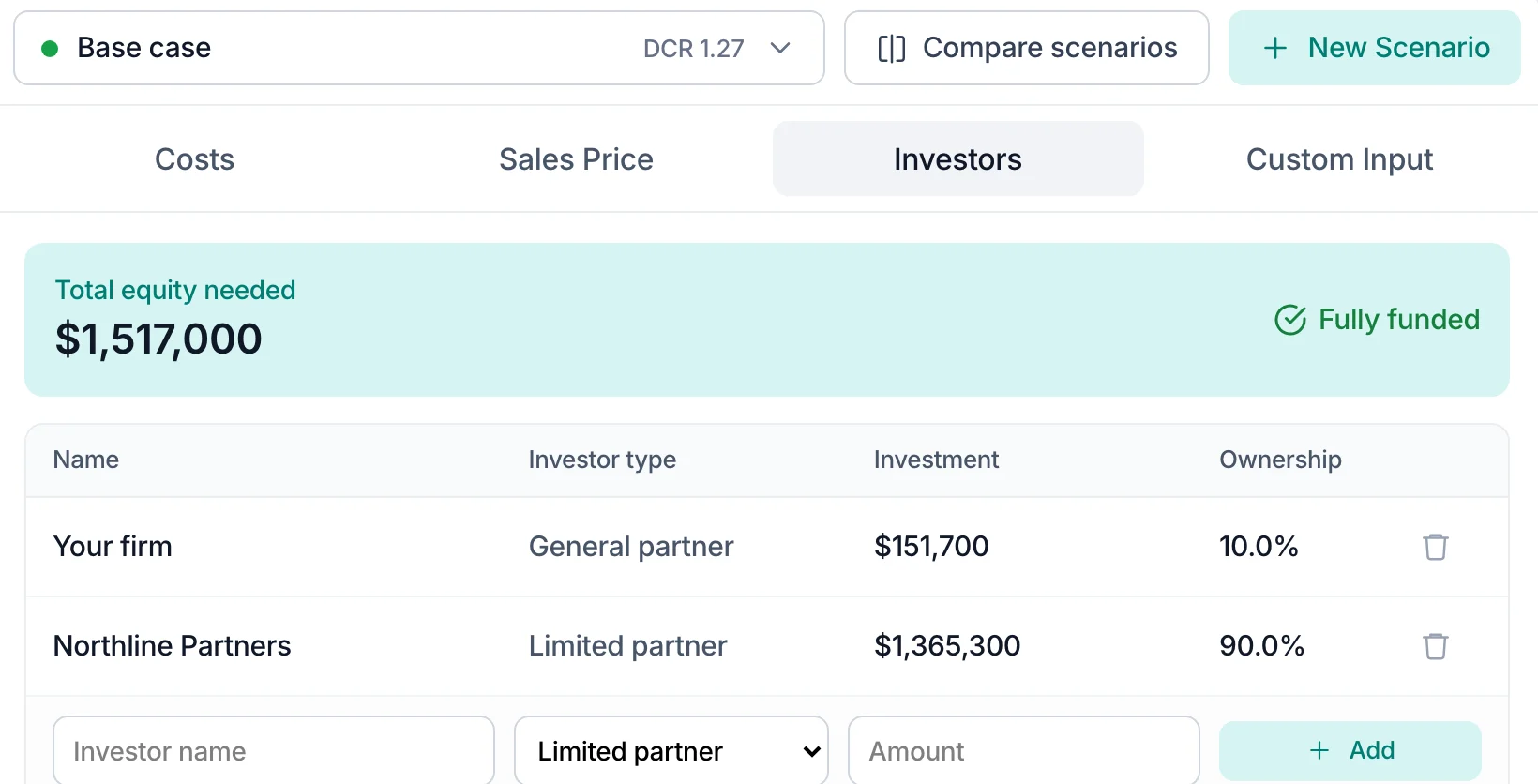
When a deal survives the first read, it becomes a project. Projects are grouped by deal type (storage, development, lease), and each one can hold several scenarios. The workspace splits the spreadsheet into four tabs: Costs, Sales Price, Investors and Custom Input. Totals like NOI and the financed amount fill in on their own, so there is nothing to recalculate by hand.
To test an idea, the user adds a new scenario, changes what they want and compares it side by side with the base case. Every changed field shows what it was before. That replaces the old habit of copying the whole spreadsheet.
I called these scenarios, not models. In an AI product, "Add new model" reads like picking an AI model.
Ask before spending
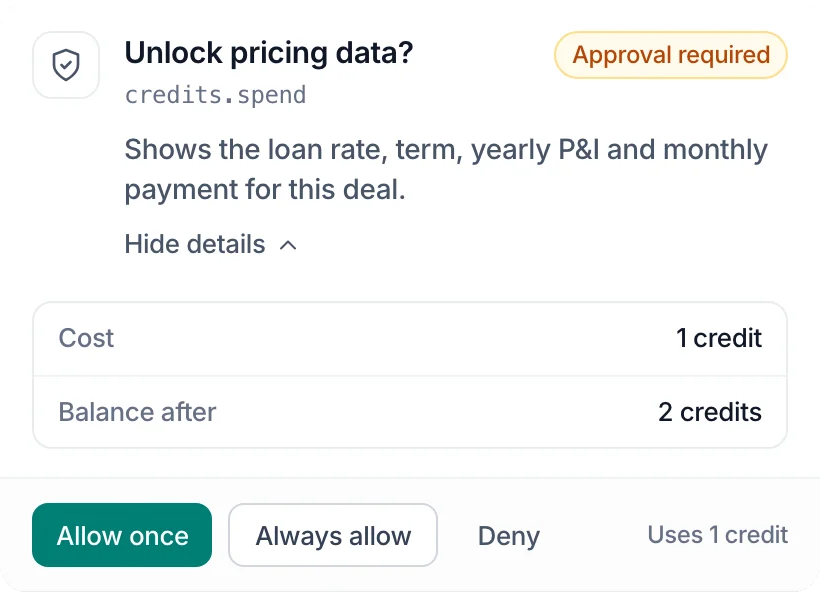
- The business runs on credits: unlocking pricing, new scenarios and regenerating each cost one
- Decipher asks first and shows the balance after, with Allow once, Always allow or Deny
A plan you can watch
- Long jobs show each step as it happens, then fold into a one-line summary
- Stop is always one tap away
Questions, not guesses
- When two figures disagree, Decipher asks which to use and links each one to its page
- Users can also type their own number
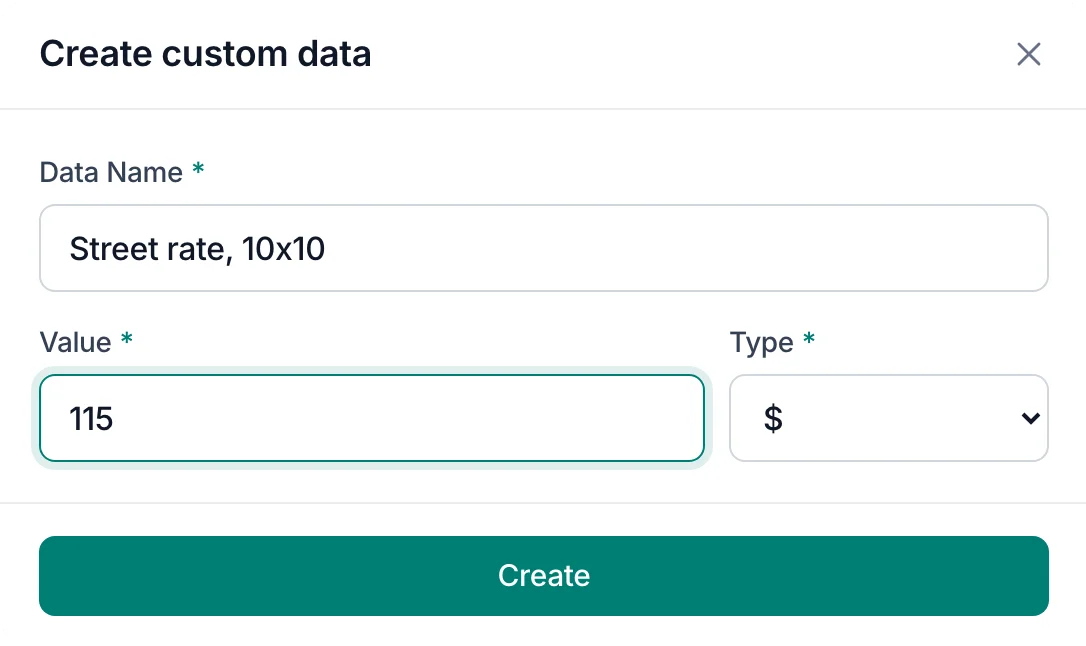
Custom inputs
- Every firm tracks something the standard model does not
- Users add their own named values with a unit, and they flow into the scenario like any other field
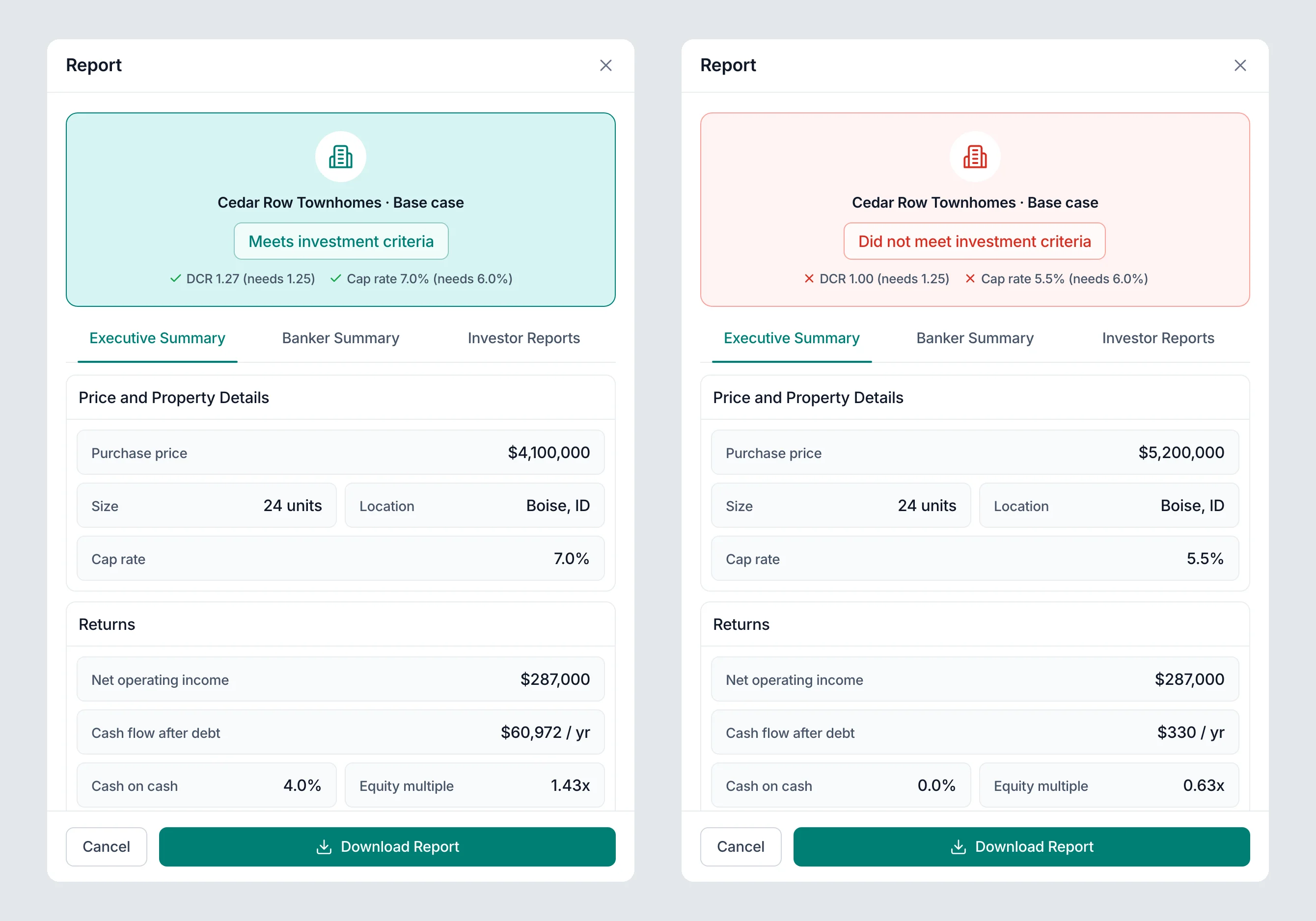
Reports
The deal has to be sold to a bank and to investors, each of whom wants a different slice of it. Generate Report produces an executive summary, a banker summary and a report per investor, and opens with one clear verdict: meets investment criteria, or does not.
Takeaways
- Read the spreadsheet before drawing a screen. In finance tools the formulas are the product. Knowing what each field drives made every later screen easier to decide.
- Scope is a design decision. Choosing one question over a full feature list is what made a focused first release possible.
- AI output needs a frame. The same four-part answer every time, assumptions labelled, risk in plain words. A format people can scan is a format they can check.
More listedProjects
Contact
Have a project? Say hello at