Flutter UI Libraries Compared: M3, Cupertino Adaptive, shadcn_ui, forui
I had to pick a UI direction for a Flutter productivity app and didn't want to guess. So I built four branches off main, swapped only the surface layer in each, ran release builds, and measured what each one actually costs.
Here's what I found.
TL;DR
Stay on Material 3 + adaptive (Cupertino on iOS). No third-party UI library.
Why:
- Free: adaptive adds +1 KB binary. shadcn_ui adds +1.2 MB, forui adds +3.9 MB.
- Feels native on iOS: if your users are mostly on iPhone, Cupertino dispatch gives them the chrome they expect (nav bar, tab bar, dialogs, buttons, switches) without forking the codebase.
- Android stays Material: same code, different paint, no second design pass.
- Brand tokens already wired: existing color, typography, and radii ThemeExtensions render correctly in both modes. No third-party library would let me keep that.
- shadcn / forui force a visual rewrite: different button rhythm, different type, full-width buttons globally (forui), heavier shells. Wrong fight for a productivity app.
What "adaptive" actually means:
- iOS gets
CupertinoNavigationBar,CupertinoTabBar,CupertinoButton,CupertinoTextField,CupertinoAlertDialog,CupertinoActionSheet,CupertinoActivityIndicator, etc. via a one-line dispatch. - Android and web stay Material 3.
- Visual feel is "iOS-shaped Material", not real iOS 26 HIG. Liquid Glass and the new translucent toolbars are not achievable in Flutter without going native. For a productivity app that's the right trade. Same one Slack, Linear, and Notion ship.
Speed:
- Bundle size is the only meaningful number. Frame timing isn't measurable on iOS Simulator (debug-only) and Material vs Cupertino on the same Skia engine is sub-microsecond delta.
- Build time: main vs adaptive macOS release was 1m 22s vs 1m 23s. Build deltas are noise.
Revisit:
- If brand direction pivots toward "Linear-style minimalist", reopen shadcn_ui (still cheaper than forui).
- Skip forui (biggest cost, distinct character closer to shadcn but heavier).
Bundle size: all four branches
iOS Runner.app, release, no codesign:
| Branch | Bundle | Δ vs main |
|---|---|---|
| main (M3 baseline) | 19.2 MB | - |
| adaptive (Cupertino dispatch) | 19.2 MB | 0 (+1 KB Dart) |
| shadcn_ui | 20.4 MB | +1.2 MB |
| forui | 23.1 MB | +3.9 MB |
- Adaptive is free: Cupertino ships inside
Flutter.frameworkalready. - shadcn_ui adds 1.2 MB: its widgets are reimplementations plus 23 transitive deps.
- forui adds 3.9 MB (biggest cost): bundles its own icon font (FIcons), larger localization tables, more deps.
Dashboard screenshots: 4 branches × light + dark
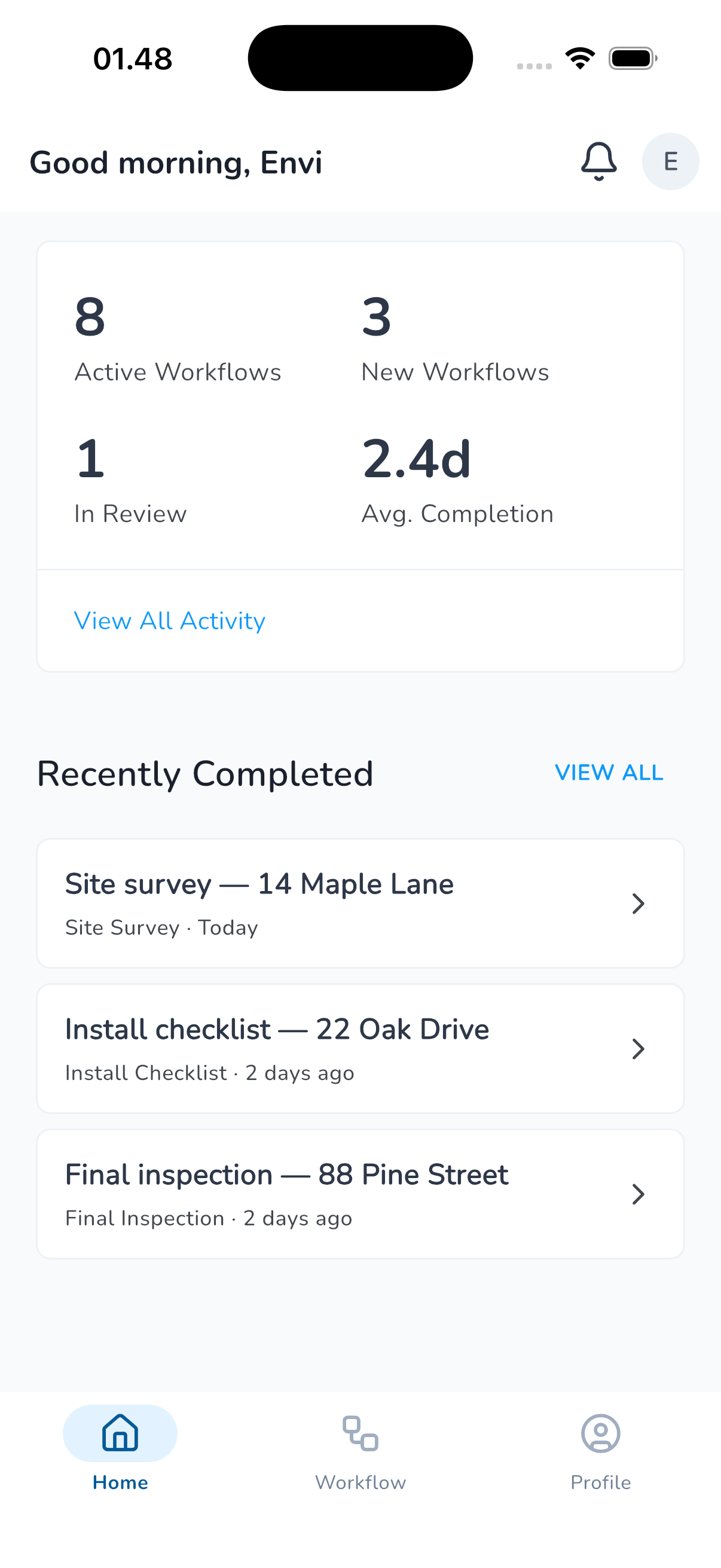
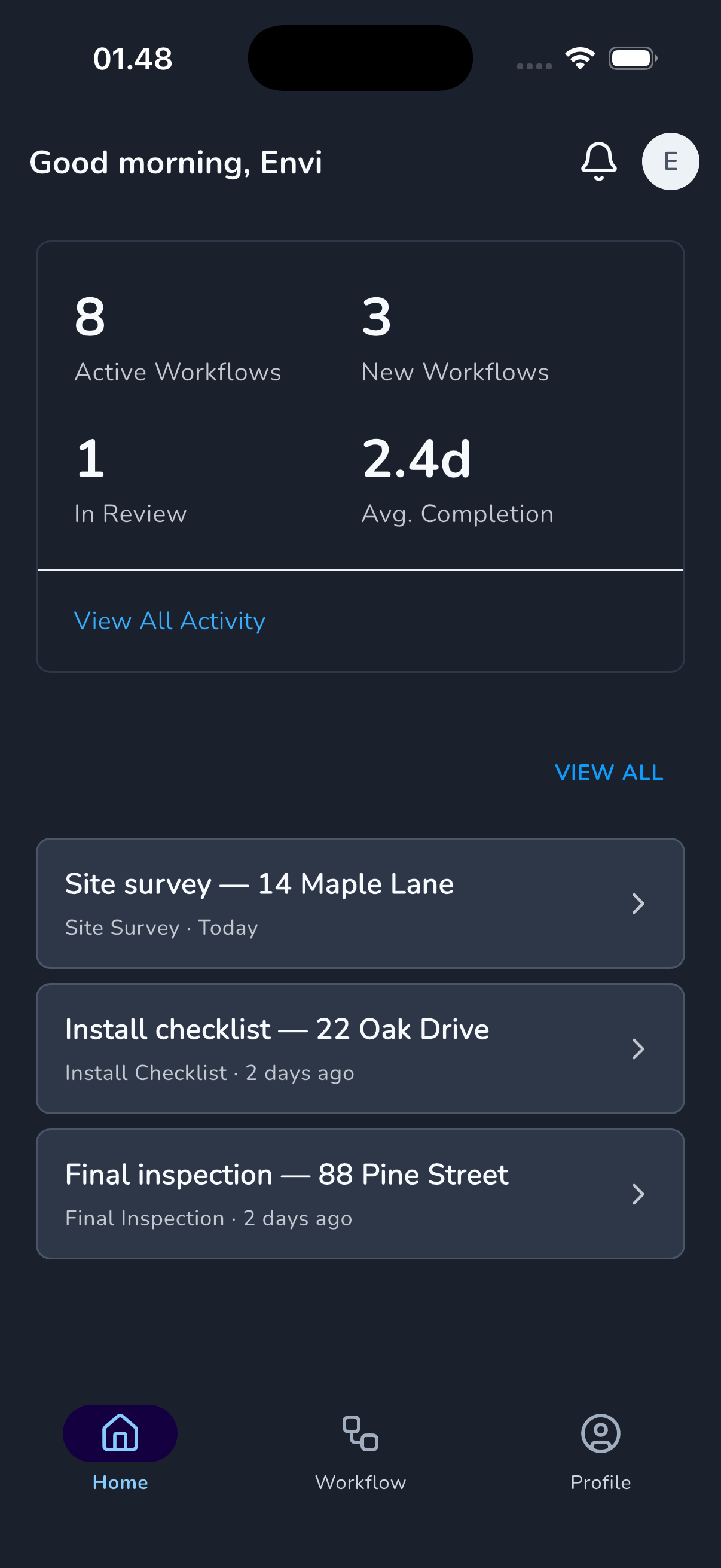
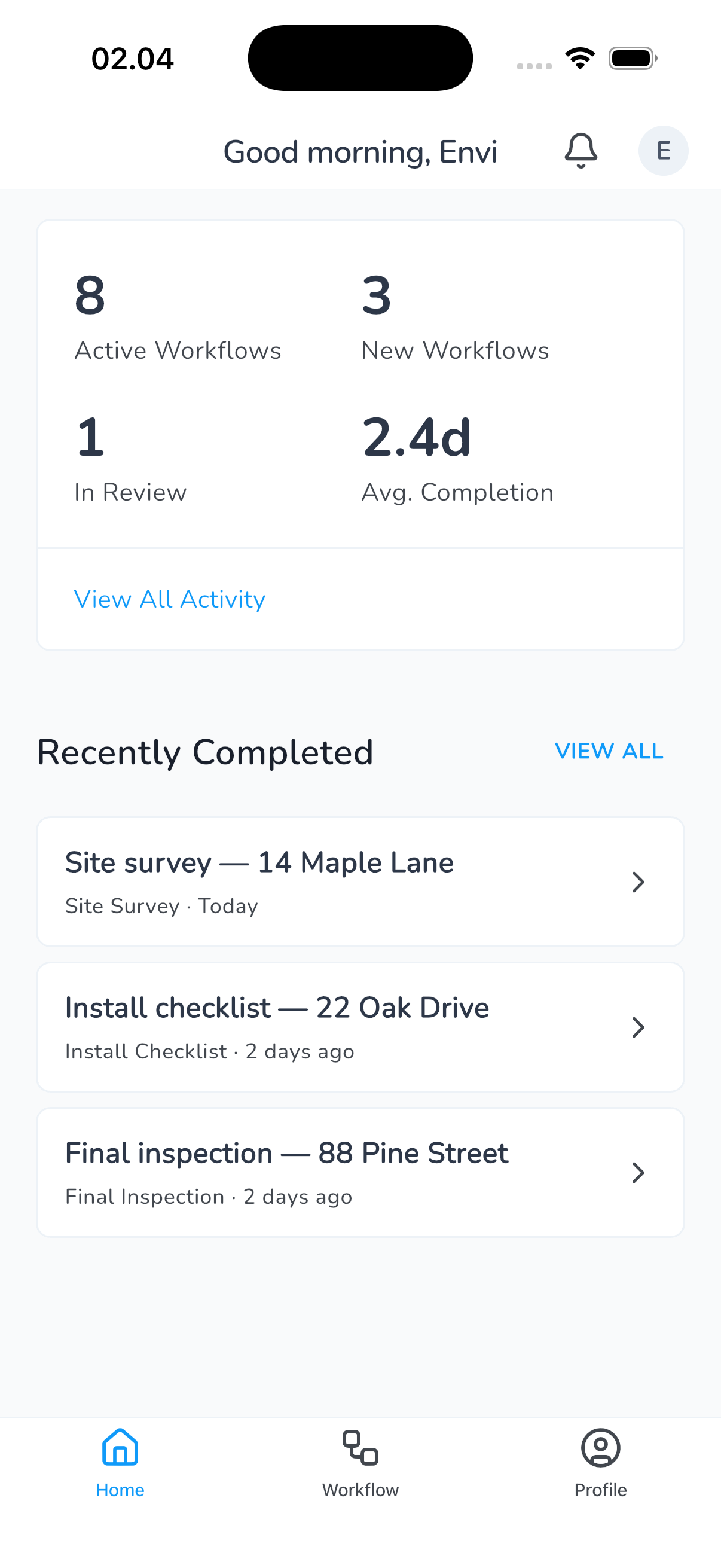
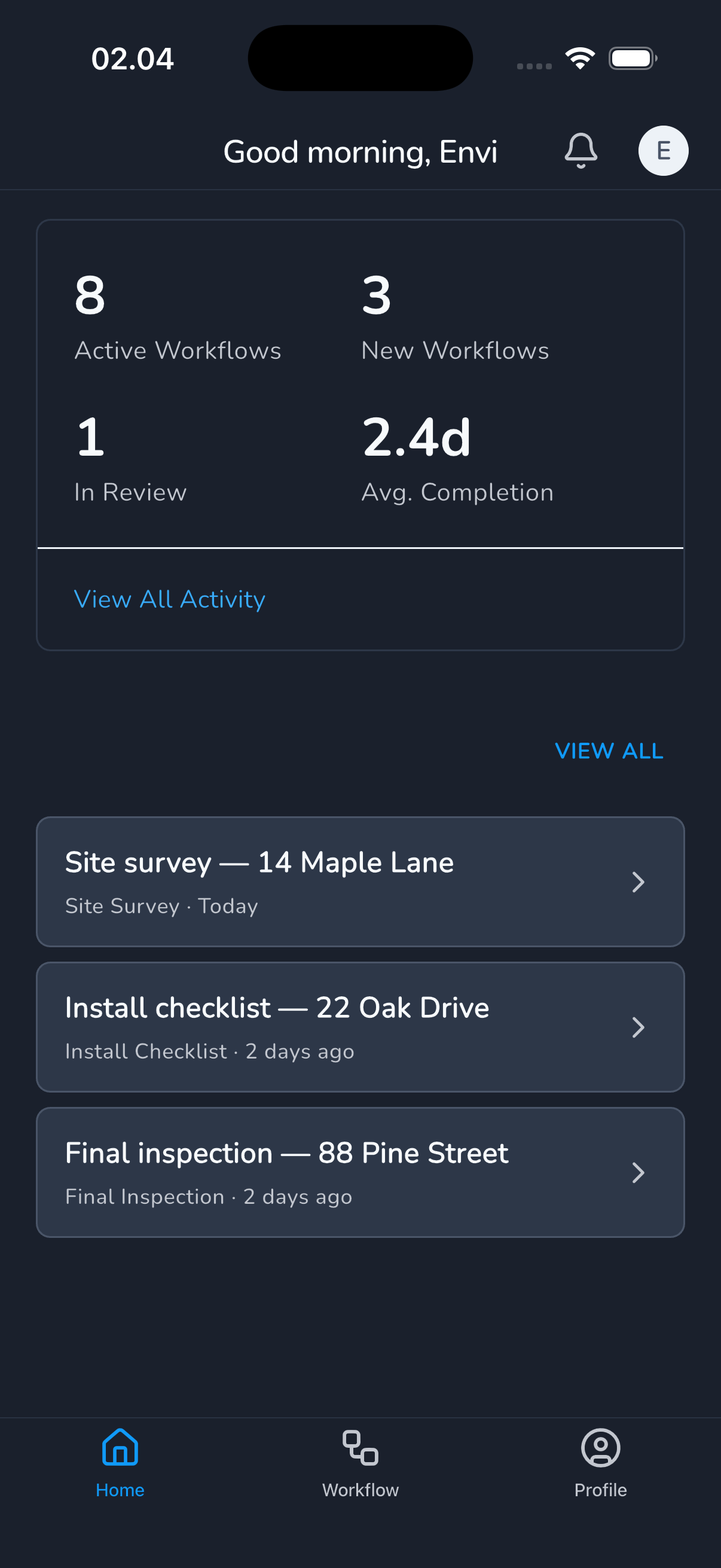
iPhone 17 simulator, iOS 26.4, debug build. Same DashboardScreen rendered through each library's surface widgets (Container / Card for main and adaptive, ShadCard for shadcn, FCard for forui). Text colors are theme-aware (Theme.of(context).colorScheme.onSurface), so dark mode doesn't break.
main (M3 baseline)
| Light | Dark |
|---|---|
 |  |
adaptive (Cupertino dispatch)
| Light | Dark |
|---|---|
 |  |
shadcn_ui
| Light | Dark |
|---|---|
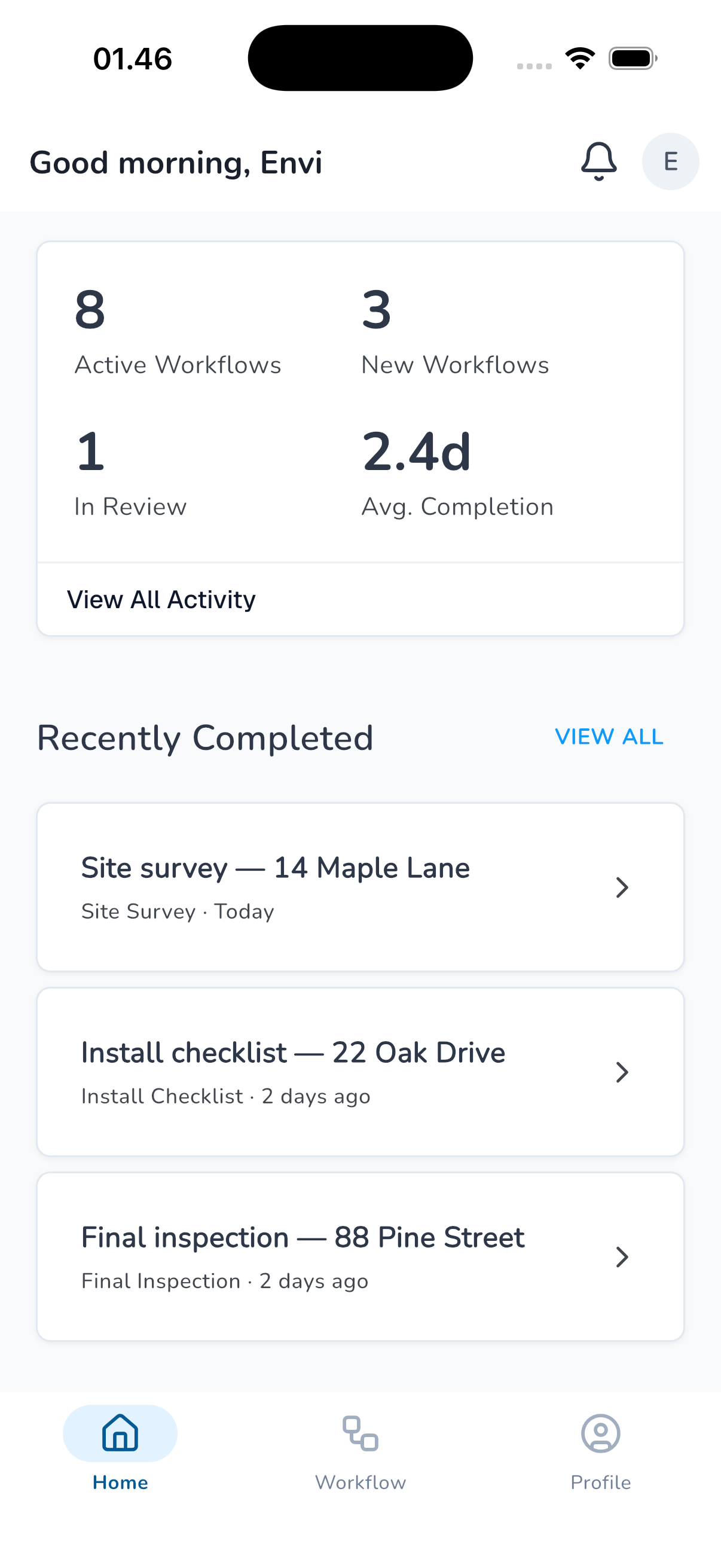 | 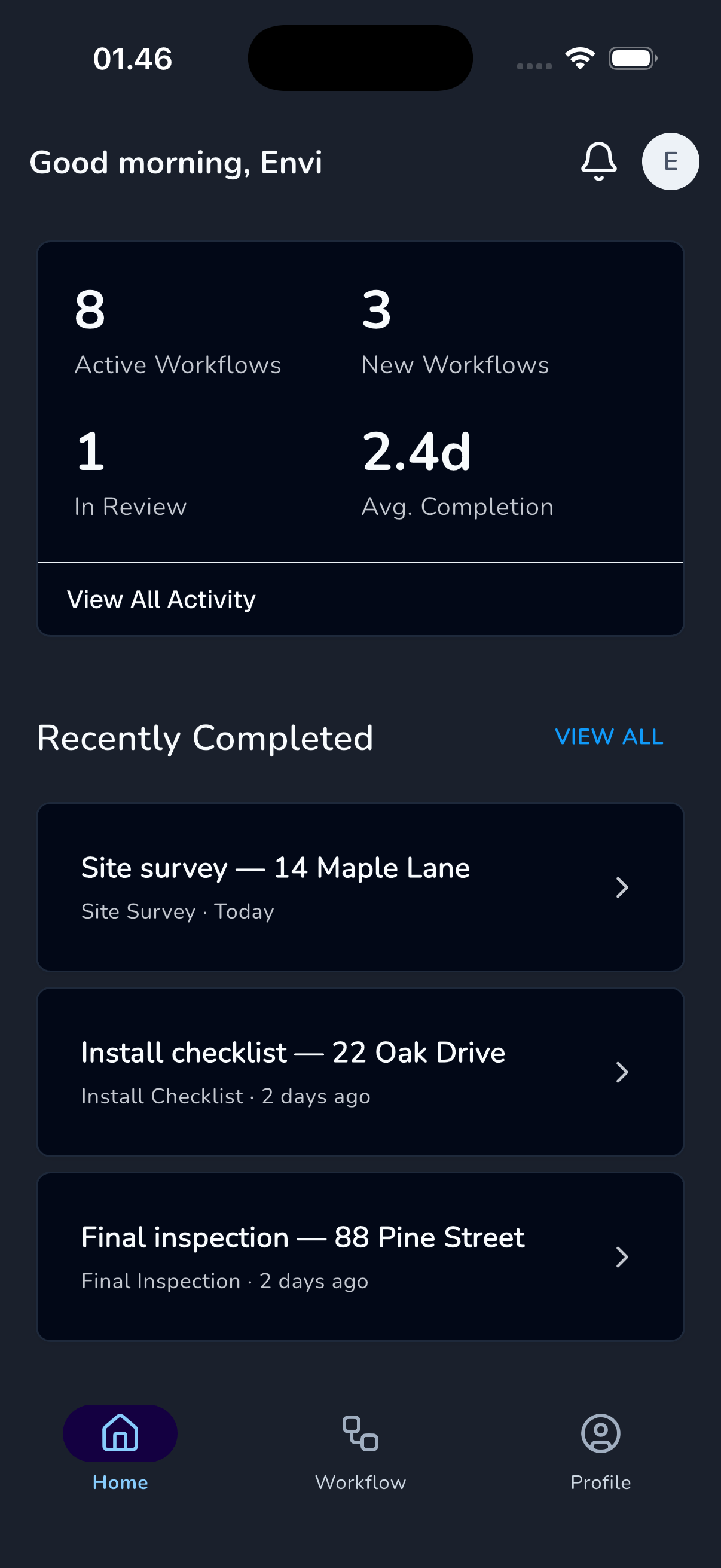 |
forui
| Light | Dark |
|---|---|
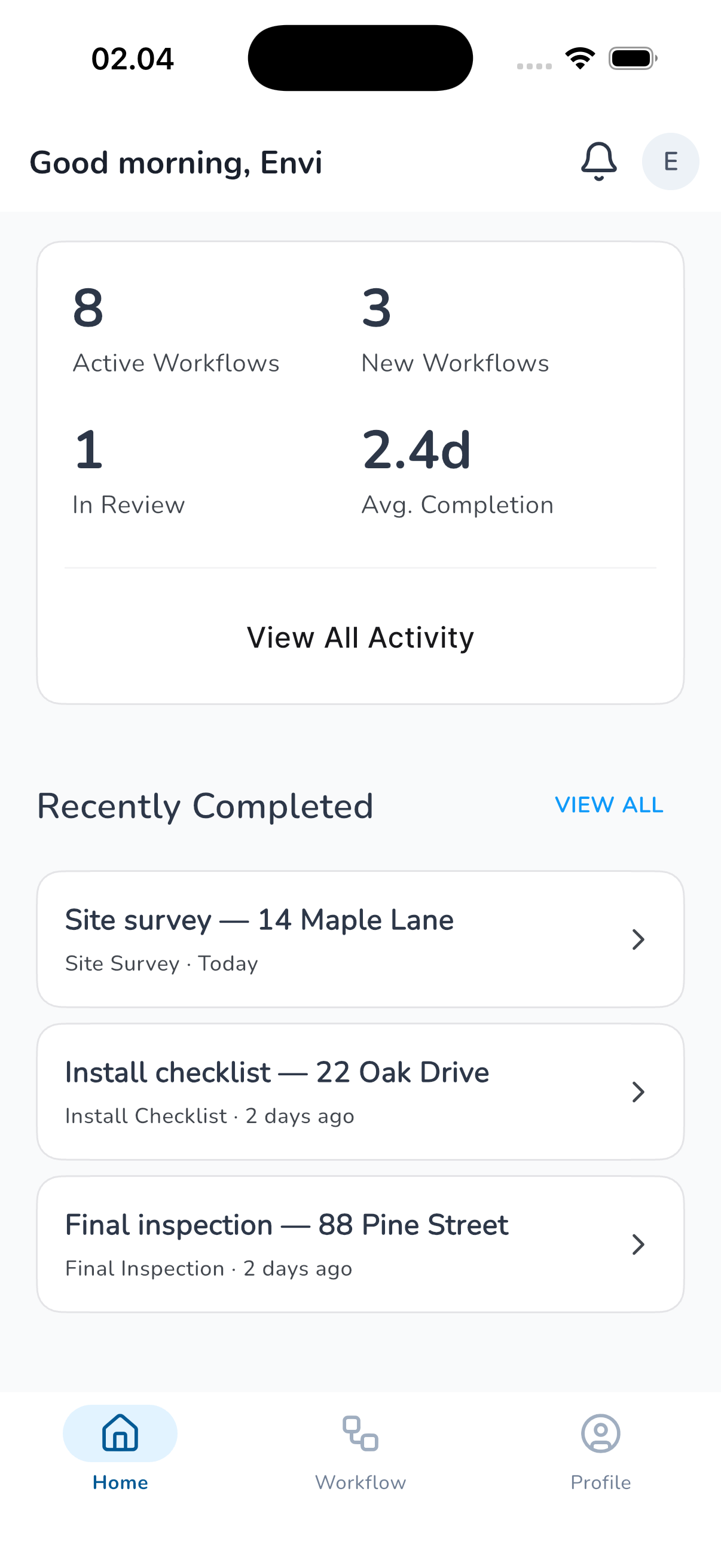 | 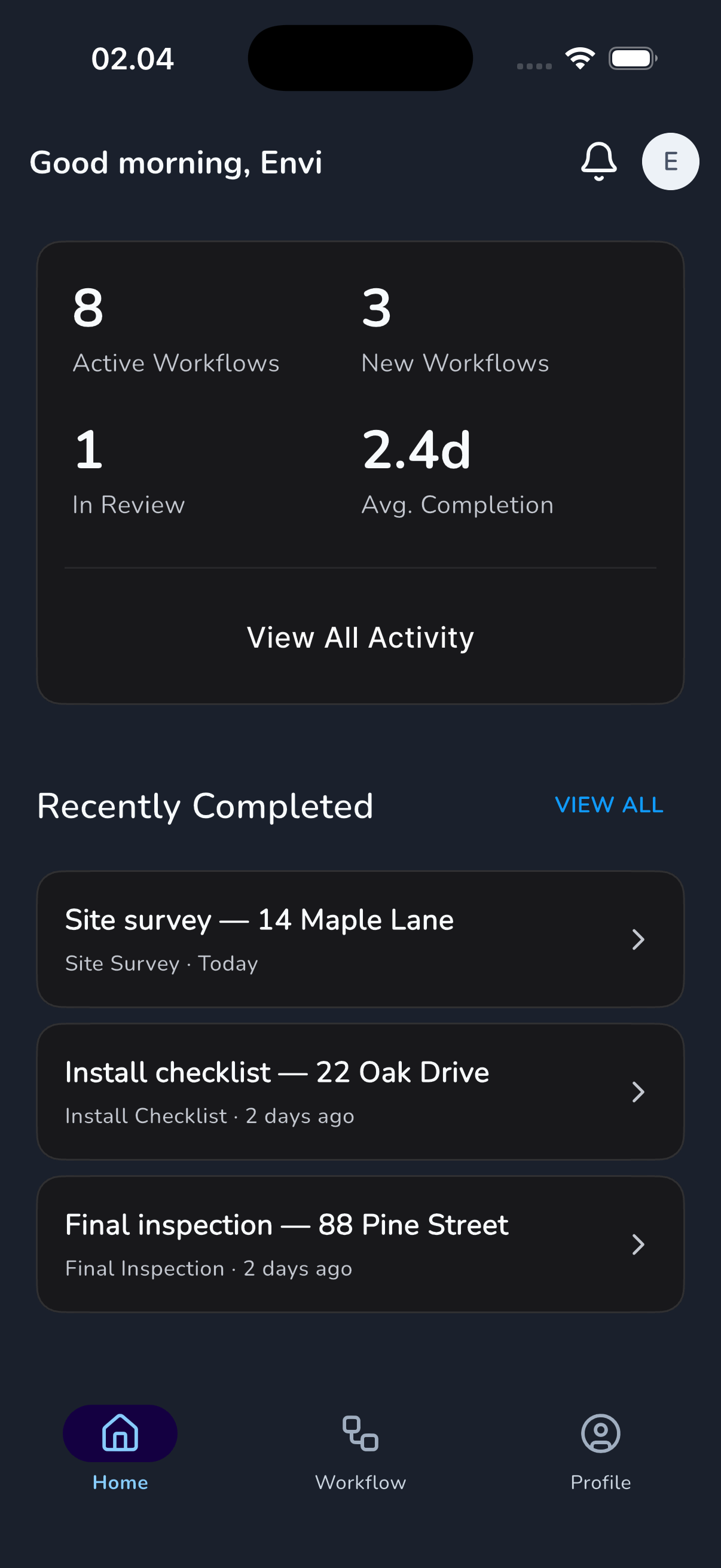 |
Dashboard visual notes
- main + adaptive: Material 3
Cardsurface, blue accent on links and buttons, light gray dividers. Adaptive's only delta on the dashboard is the iOS-style nav-bar hairline (the header sits under a 0.5px Cupertino border instead of the Material flat AppBar). The list-item cards and metrics card are otherwise identical. - shadcn_ui:
ShadCardsurfaces, tighter rounded corners, subtler 1px border. Link-style actions useShadButton.link(black underlined-on-hover instead of Material blue text). Dark mode uses near-blackslate.darksurfaces. - forui:
FCardsurfaces feel slightly lighter and rely more on type hierarchy. Link-style actions useFButton.ghost(no underline). Dark mode useszinc.darkpalette.
Important caveat: the content widgets inside the dashboard are still pure Material across all 4 branches. The spike only swaps the surface containers. Adopting any of these libraries fully would require rewriting the inner widgets too. The screenshots show the realistic minimum impact of the swap, not the full visual character.
Playground screenshots: component-level
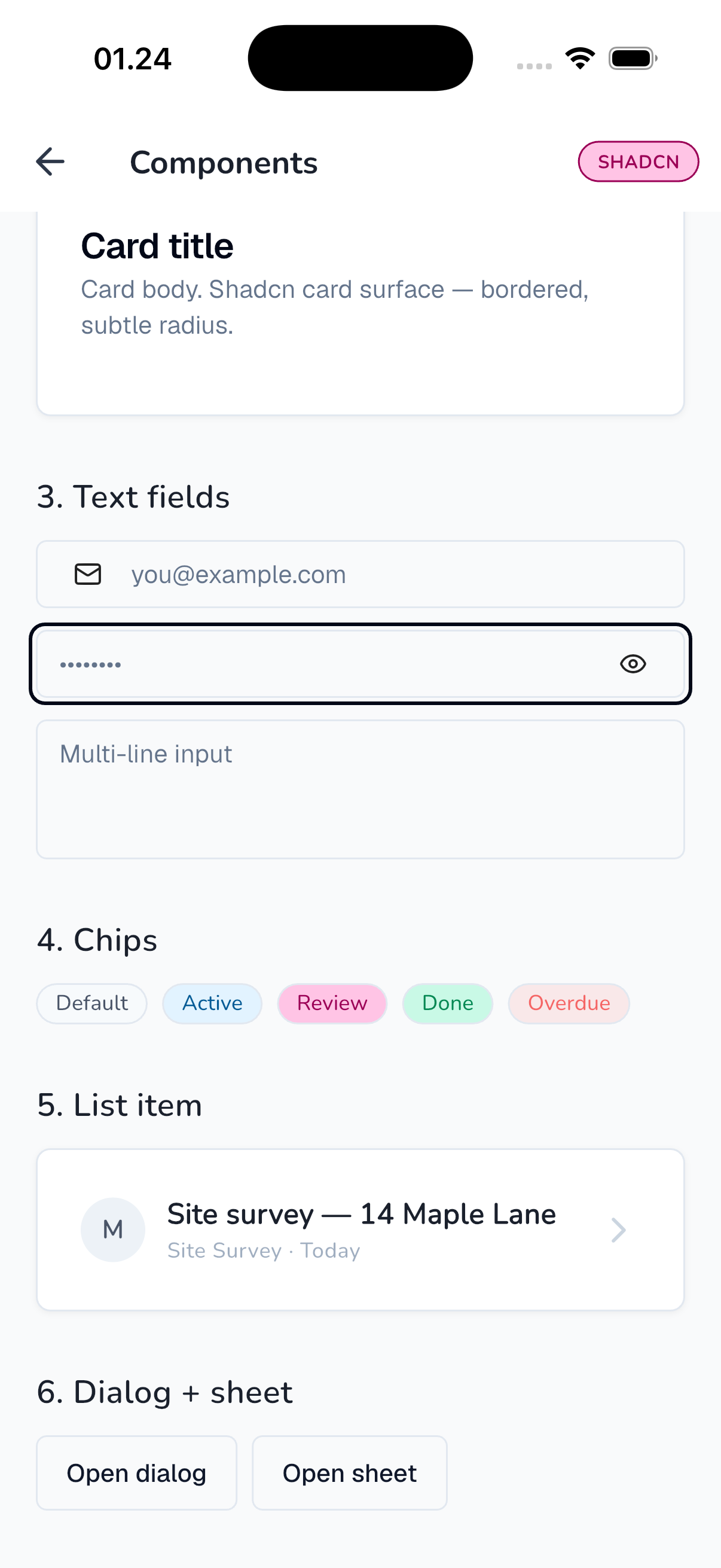
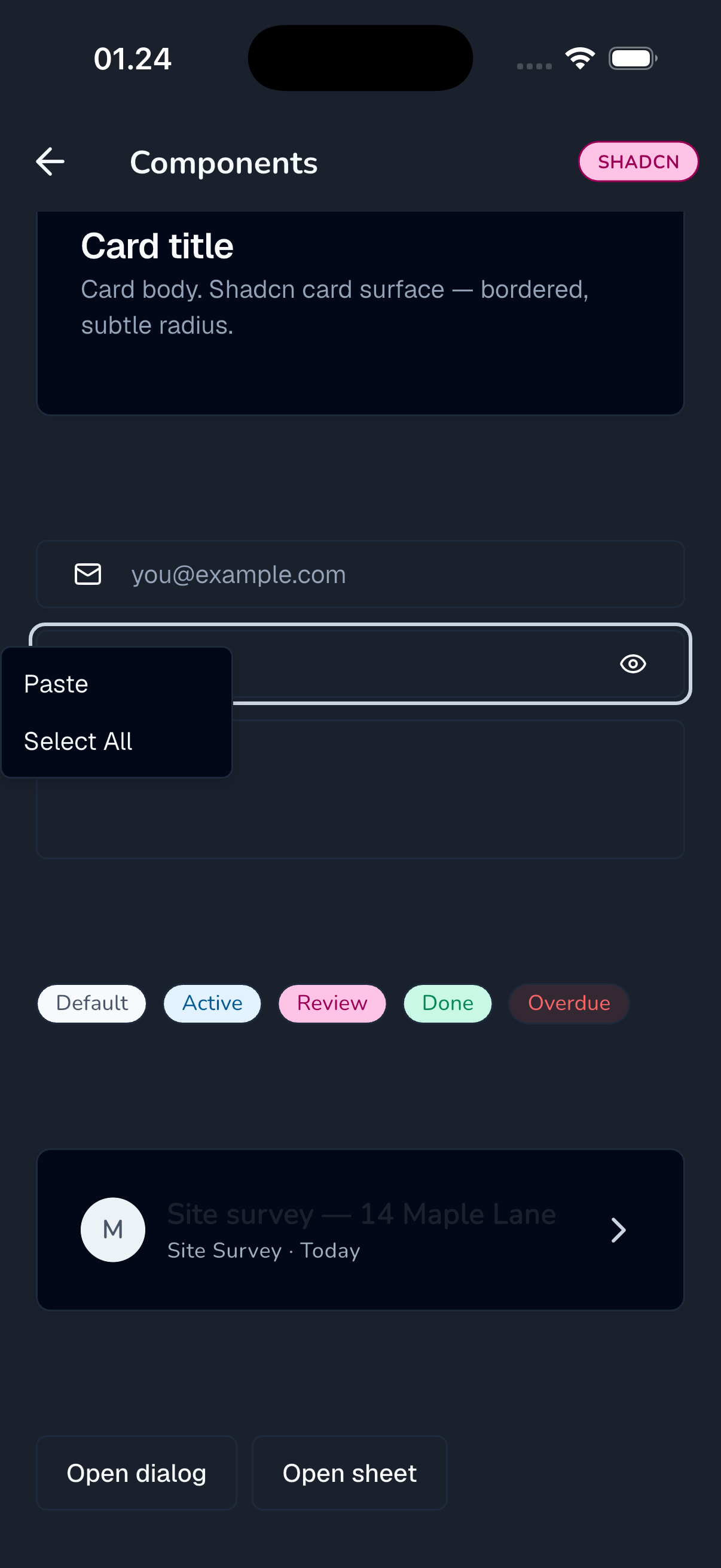
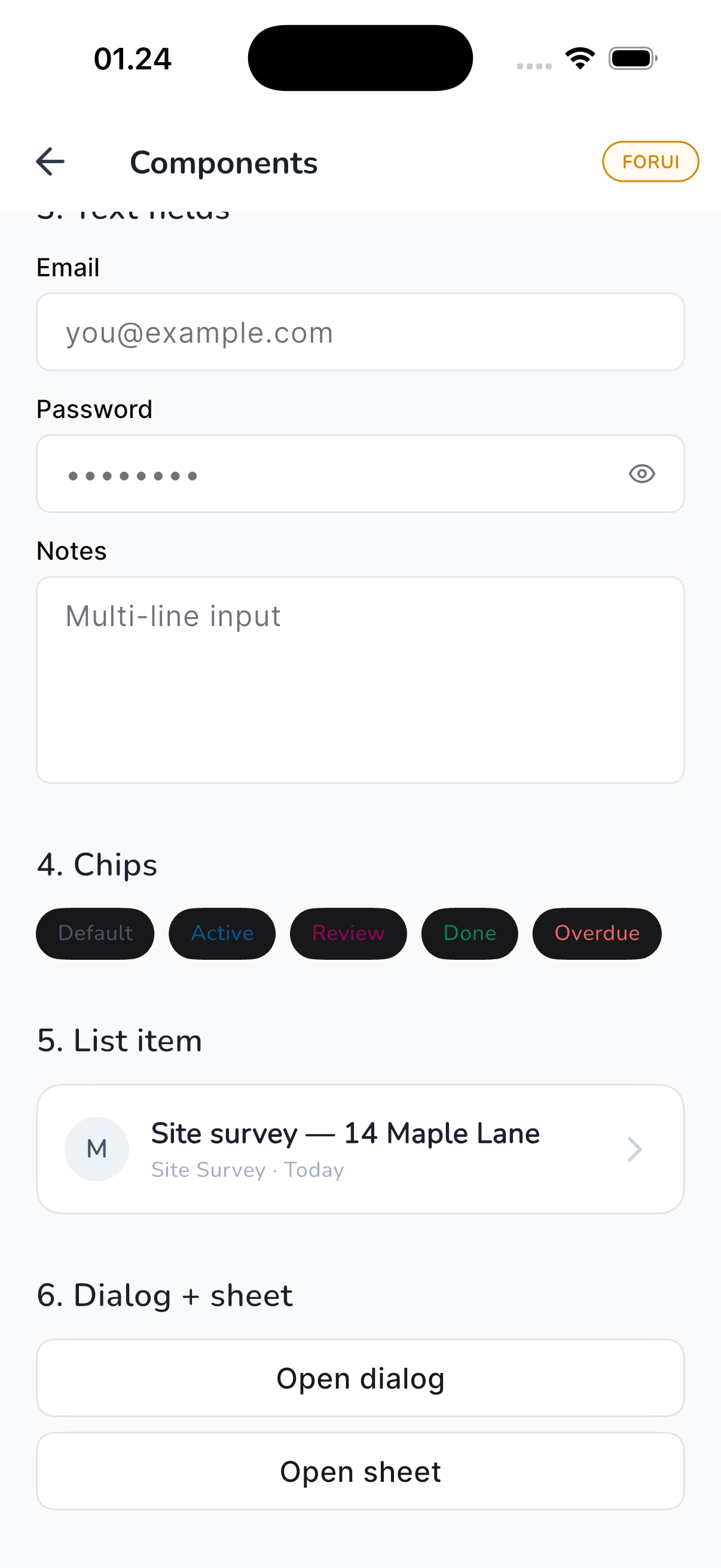
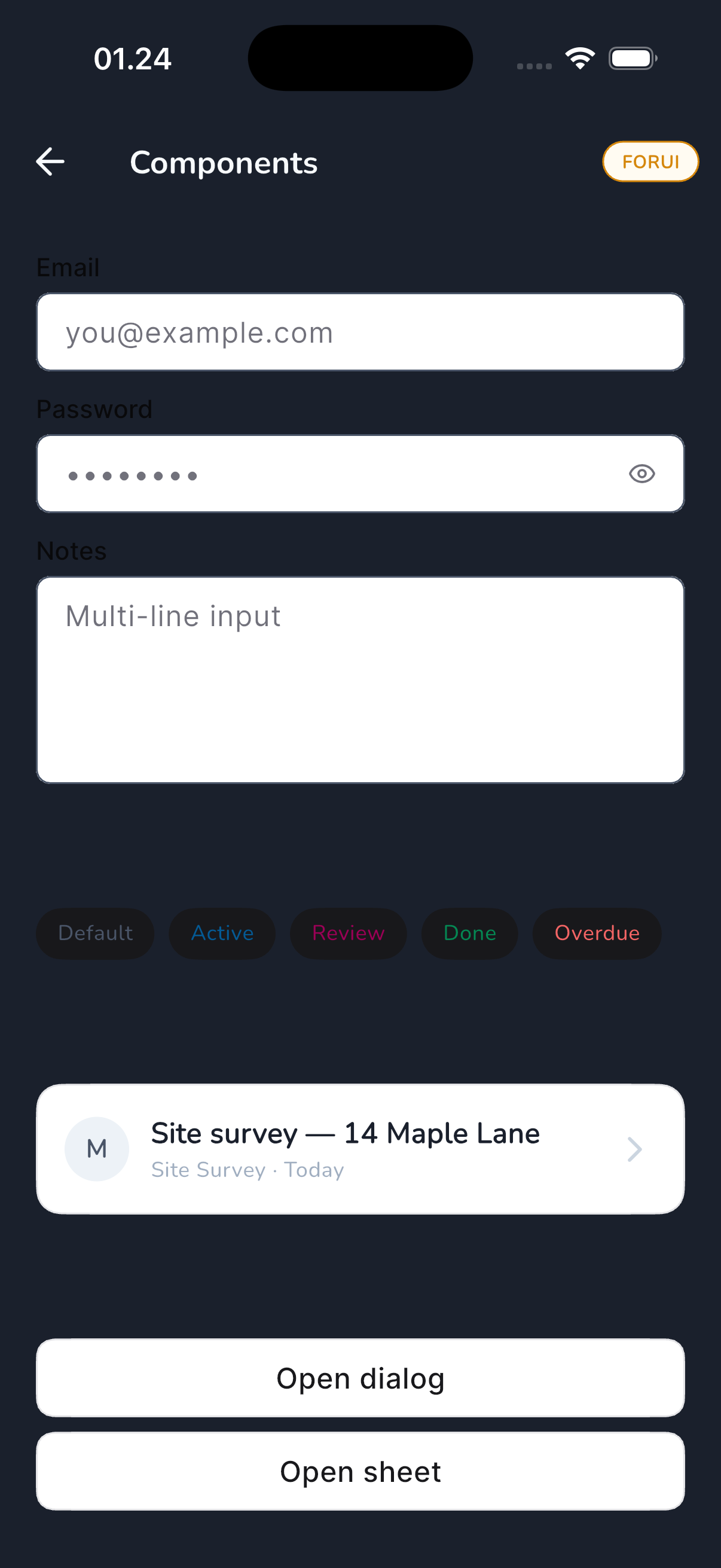
The dashboard above only shows surface differences. A separate /playground route renders 6 canonical components built directly with each library's primitives, which is where library character is loudest.
shadcn_ui playground
| Light | Dark |
|---|---|
 |  |
forui playground
| Light | Dark |
|---|---|
 |  |
Playground visual notes
- shadcn_ui: auto-width buttons (5 buttons fit on 2 rows), distinct dark-fill primary, sharp-edged outlined secondary.
- forui: full-width buttons by default in touch theme (one button per row), so any horizontal button group re-flows globally. Black primary fill similar to shadcn but heavier.
Implication: forui's vertical button stacking changes screen layout globally, not just buttons. shadcn keeps closer to the current Material rhythm and is an easier drop-in.
Build time
main vs adaptive macOS release: 1m 22s vs 1m 23s. Build-time deltas are noise at this scale. Bundle size is the cleaner number.
Frame timing: not measurable for this comparison
- iOS Simulator only supports
debugmode. Profile and release rejected with "Mode not supported by iPhone 17". - Real frame numbers need a physical iPhone or macOS desktop release.
- Material vs Cupertino on the same Skia engine = sub-microsecond delta. Not a deciding factor.
Liquid Glass / iOS 26 HIG: not achievable in Flutter
- Cupertino widgets are Flutter's Skia recreation, frozen around iOS 14 visuals. They do not call into UIKit, so no
UIGlassEffect, no SF Symbols, no new translucent toolbar materials. - All 5 community Flutter "Liquid Glass" packages are Skia or shader recreations, not real Apple Glass. The most mature one (
liquid_glass_rendererby whynotmake-it) self-describes as "experimental, computationally intensive, should not be blindly added to production apps". Theirapple_liquid_glasssubpackage admits it's "WIP that just re-exports liquid_glass_renderer". - For true Apple Glass: native SwiftUI / UIKit, or platform views in Flutter (heavy, fragile, breaks hot reload).
- Simplest fake: 5-line
BackdropFilter + ImageFilter.blur, which is what every glass package secretly wraps.
What Cupertino is for
About 80% iOS feel for about 5% effort. Right level for productivity apps (Slack, Linear, Notion ship like this). Wrong tool for premium consumer apps where pixel-perfect HIG matters.
Visual character per branch
- main (M3): flat, blue-accent, Material 3 floating-label inputs, rounded buttons, no shadows on cards (border-only with brand override).
- adaptive: chrome flips to Cupertino on iOS (CupertinoNavigationBar, CupertinoTabBar, CupertinoButton, CupertinoTextField, CupertinoListTile, CupertinoAlertDialog, CupertinoActionSheet). Zero binary cost. Visual feel is "iOS-shaped Material", not real HIG. Liquid Glass not implemented, frozen around iOS 14 visuals.
- shadcn_ui: distinct dark / black filled buttons, outlined secondary, sharper corners, different type rhythm. Includes ShadDialog, ShadSheet, ShadBadge, ShadInput. Most deviation from a typical Material brand.
- forui: black primary buttons (like shadcn), but full-width by default in touch theme. Has its own icon font (FIcons), F-prefixed widgets, FToaster + FTooltipGroup wrappers. Largest binary footprint.
Decisions
- Adaptive = cheap to keep, no decision blocker.
- shadcn_ui vs forui = +1.2 MB vs +3.9 MB. shadcn is the cheaper investment if a "Linear / shadcn" aesthetic is desired. forui pays 4 MB for distinct typography and touch-first layouts.
- Recommendation: stay on M3 + adaptive for production (lowest weight, brand tokens already wired). Revisit shadcn_ui if the brand pivots toward "Linear-style minimalist". Skip forui (biggest cost, visual character closer to shadcn but heavier).
Tooling notes
So future-me doesn't repeat the mistakes:
- iOS Sim = debug only. Don't chase profile or release perf there.
flutter build ios --analyze-size --no-codesignworks without a device.flutter build macos --release --analyze-sizeworks afterflutter create --platforms=macos ..flutter build apk --analyze-sizerequires Android SDK installed.- Real per-branch perf needs
--profileon a physical iPhone OR--releaseon macOS desktop. - For component-level visual comparison across branches, a
/playgroundroute gated by--dart-define=PLAYGROUND=1keeps the dashboard pristine for screenshots.
Contact
Say hello at
work@envibagus.comBased in Bali (GMT+8). I work async and keep overlap hours with Asia, Europe, and US mornings. Currently open to freelance projects and full-time roles.